RU

Unit Control

Staff, stock, documents and analytics for your business — in one app

For cafés, bars, bakeries, catering, hotels, beauty salons and shops — any business with a team and goods. One location or a chain: switch on only the modules you need.

  • Keep your current POS
  • Phone, tablet, PC and Mac
  • English, Русский, Crnogorski, Українська
  • Data stored in the EU
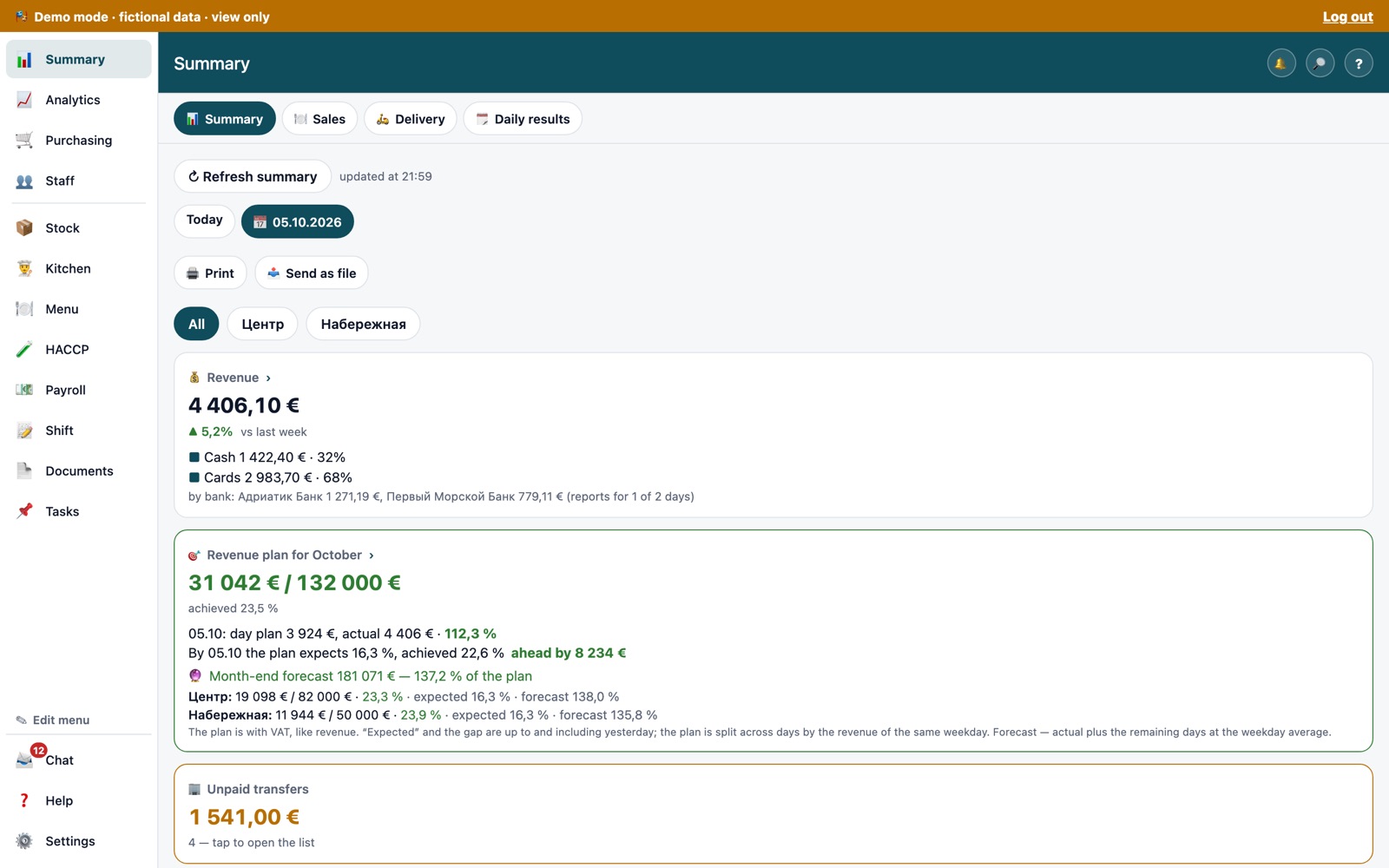
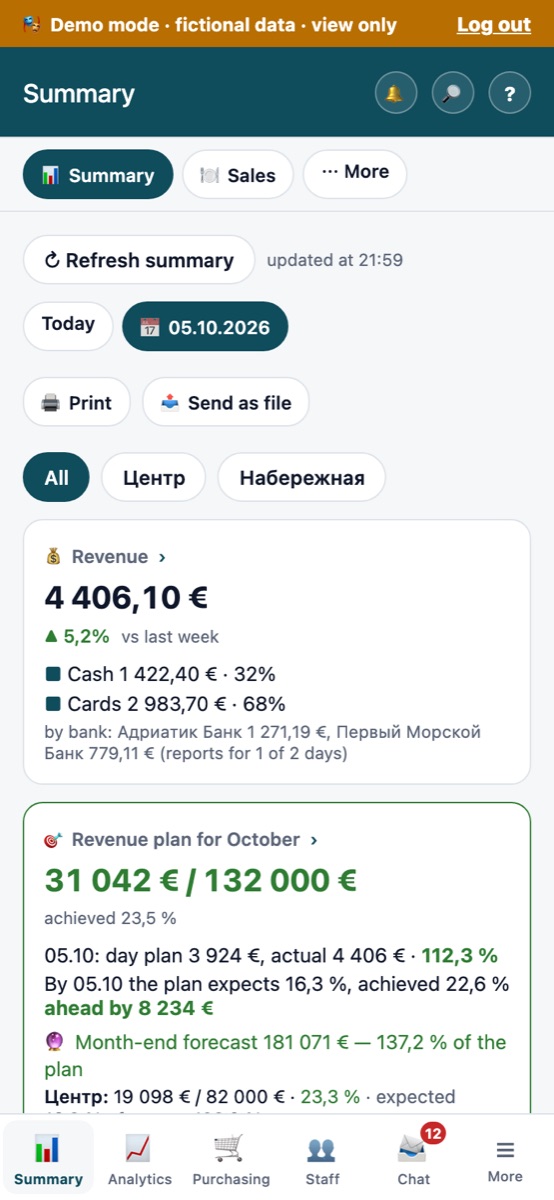
Summary on desktop: daily revenue, monthly revenue plan and forecast (demo company, fictional data) Summary on a phone (demo company)

Who it's for

For owners, directors and managers who need to see people, stock and money every day — not at the end of the month. Each employee sees only their own sections and numbers.

  • ☕ Cafés
  • 🍸 Bars
  • 🍽 Restaurants
  • 🥐 Bakeries
  • 🍱 Catering
  • 🏨 Hotels
  • 💇 Beauty salons
  • 🛍 Shops

Features

Cards are grouped by task; each shows which modules it covers. Core is always on; everything else is switched on per location.

Staff

  • Monthly shift schedule and timesheet.
  • Employee requests: day off, sick leave, shift swap.
  • Vacations, personnel files with documents and expiry dates.
  • Labour cost and its share of revenue; monthly salaries and hourly rates.
  • Payroll payouts: pay sheets, cash and bank, payslips paid module
Core + “Payroll payouts” module

Clock-in

  • Clock in and out from a phone inside the location's geofence.
  • Or a QR code on a tablet at the entrance — a photo of the code won't work.
  • Clock-ins go straight to the timesheet.
“Clock-in” module

Purchasing and invoices

  • Invoices with scans, supplier prices, price history.
  • Purchasing budgets per department, request forms.
  • Price changes vs. the previous delivery and vs. a month ago.
  • AI recognition: photo or PDF of an invoice → line items, check against the price list, price-rise alerts AI
“Purchasing and invoices”, “AI invoices” modules

Supplier orders and receiving

  • Suggested order from par levels and sales forecast — a person approves it.
  • Order split by supplier, text in the supplier's language.
  • Send via WhatsApp or Viber in one tap.
  • Receiving: short delivery, damaged goods, returns, invoice photo.
“Supplier orders and receiving” module

Stock, stocktake, write-offs

  • Stocktake with book stock alongside; pause and resume any time.
  • Surpluses and shortages, actual vs. theoretical.
  • Write-offs from the phone during the shift, limits, staff meals.
“Stocktake”, “Write-offs” modules

Recipes and food cost

  • Dishes and recipe cards with cost and margin at current purchase prices.
  • Cost increase over 1 and 3 months, ABC menu analysis.
  • Recipes for cooks — without prices.
  • Production requests between locations.
“Kitchen: recipe cards and recipes”, “Production requests” modules

Menus and price tags

  • Menu versions, stop list, allergens and nutrition.
  • Printed menus: 11 styles, 4 languages.
  • A4 price tags from templates, print queue.
“Menu”, “Price tags” modules

Analytics

  • Revenue, number of checks, average check — vs. last week and plan.
  • Purchasing and suppliers, minimum stock, payroll, shifts.
  • All locations on one screen.
  • AI summary: 3–6 points on “what matters today” AI
  • AI assistant: questions in plain words, answers within the asker's permissions AI
“Analytics”, “Sales”, “AI summary”, “AI assistant” modules

Documents and inspection deadlines

  • Required documents for the location's country, plus your own items.
  • Recurring checks — the next due date is calculated automatically.
  • Reminders 30 days ahead, on the due date and when overdue.
  • HACCP logs from the phone: temperatures, cleaning, receiving, QR labels, inspection report (PDF)
Core

Tasks and shifts

  • Task board: repairs, things to buy, assignments with deadlines.
  • Shift report: closing checklist, photos, incidents.
Core + “Shift report” module

Team chat by location

  • Channels: announcements, location, departments, groups.
  • “Important” posts with a “Read” button and a list of who hasn't read them.
Core

POS, offline, languages

  • POS connection via a connector that only reads sales, purchases and stock. No connector for your POS yet — import Excel/CSV.
  • Works offline: actions are saved on the device and sent when the connection is back.
  • 4 interface languages: EN, RU, ME, UK — each employee picks their own.
Included in every plan

How to start

Initial setup is easier on a computer. After that, your team works from their phones.

14 days free

Send a request and we'll open a trial. Create your company and locations, switch on the modules you need.

POS data

Install the connector or upload reports in Excel/CSV. We can connect it for you as a one-time service.

Your team

Invite people by e-mail or link and assign roles: manager, chef, storekeeper, employee or your own.

Every day

Summary in the morning, clock-ins and write-offs during the day, shift report in the evening.

Data and security

Your data belongs to you. Export it at any time.

🇪🇺 Data in the EU

The working database and files are stored on servers in the European Union.

🔐 Two-factor authentication

Codes from an authenticator app. Mandatory for directors and owners.

🛡 Encrypted backups

Database backups are made automatically and stored encrypted.

🔑 Roles and permissions

Permissions decide which sections and numbers a person sees: revenue, cost, payroll, pay rates. Access is revoked the moment an employee is dismissed.

📜 Activity log

Who did what and when: sign-ins, roles, pay rates, documents, exports, settings.

⬇️ Full data export

A ZIP archive: CSV and JSON tables by section, plus copies of files.

Pricing

Prices are per location per month, excluding VAT. Pick a plan, or combine Core with the modules you need. 14 days free.

Start

€99

per location / month

  • Core
  • Sales
  • Purchasing and invoices
  • Clock-in
  • Shift report

Cafés and bars without a kitchen, shops, salons.

Business

€229

per location / month

  • All modules except AI
  • Kitchen and recipe cards, stock, stocktake
  • Supplier orders and receiving
  • Menus and price tags, analytics, payroll payouts

Restaurants, cafés with a kitchen, bakeries, catering, hotels.

Business + AI

€299

per location / month

  • Everything in Business
  • AI summary
  • AI assistant — 300 questions
  • AI invoices — 100 pages

For less manual entry and a daily briefing on your numbers.

Chain

€259

per location / month, from 3 locations

  • Everything in Business + AI
  • Consolidated analytics across locations
  • Shared warehouse and production
  • Priority support

10+ locations — custom pricing.

Example setups without a kitchen

💇 Beauty salon

Core + Clock-in + Payroll payouts + AI summary

≈ €101 per month

🛍 Shop

Core + Sales + Purchasing and invoices + Stocktake + Price tags

≈ €146 per month

Core and modules

ModuleWhat you get€ / month
CoreSummary, My schedule, Staff (schedule, timesheet, payroll cost, vacations, requests, personnel files), Documents and checks, Tasks, Chat€59
Purchasing and invoicesInvoices, supplier prices, budgets+€39
Kitchen: recipe cards and recipesRecipe cards, cost, margin, recipes without prices+€39
AnalyticsRevenue, purchasing, stock, payroll across locations+€29
MenuMenu versions, stop list, allergens, printing+€25
StocktakeStocktakes, stock levels, actual vs. theoretical+€25
Supplier orders and receivingSuggested orders, WhatsApp/Viber, receiving with photos+€25
Payroll payoutsPay sheets, cash and bank, payslips+€15
Write-offsWrite-offs, limits, staff meals+€15
SalesItem sales, hours and days, ABC+€15
Delivery coming soonDelivery order breakdown, couriers+€15
Clock-inGeofence or QR kiosk, timesheet+€15
Shift reportShift closing, photos, incidents+€8
Price tagsA4 templates, print queue+€8
Production requestsRequests to the central kitchen and prep, transfers+€8
✨ AI summaryThe day's key points in 3–6 bullets+€12
✨ AI assistantQuestions in plain words, 300 questions per month+€39
✨ AI invoicesInvoice recognition, 100 pages per month+€39

One-time services

ServiceWhat's included€
POS connectionConnector installation, export check, first data load€250
Recipe card migrationUp to 100 recipe cards, matched to purchasing items€350
Turnkey setupPOS connection, up to 100 recipe cards, menus and price tags, training€790
  • Prices exclude VAT — VAT is calculated separately, depending on the country.
  • EU prices shown. A regional price applies in Montenegro, Serbia and neighbouring countries — use the switch above.
  • 14-day free trial, no card required. After that, one invoice a month — no automatic charges.
  • A module switched on mid-month is charged for the remaining days only.

Demo

A demo company with fictional locations, employees and numbers: open any section without breaking anything.

Request a demo

Demo access on request — send us a request below.

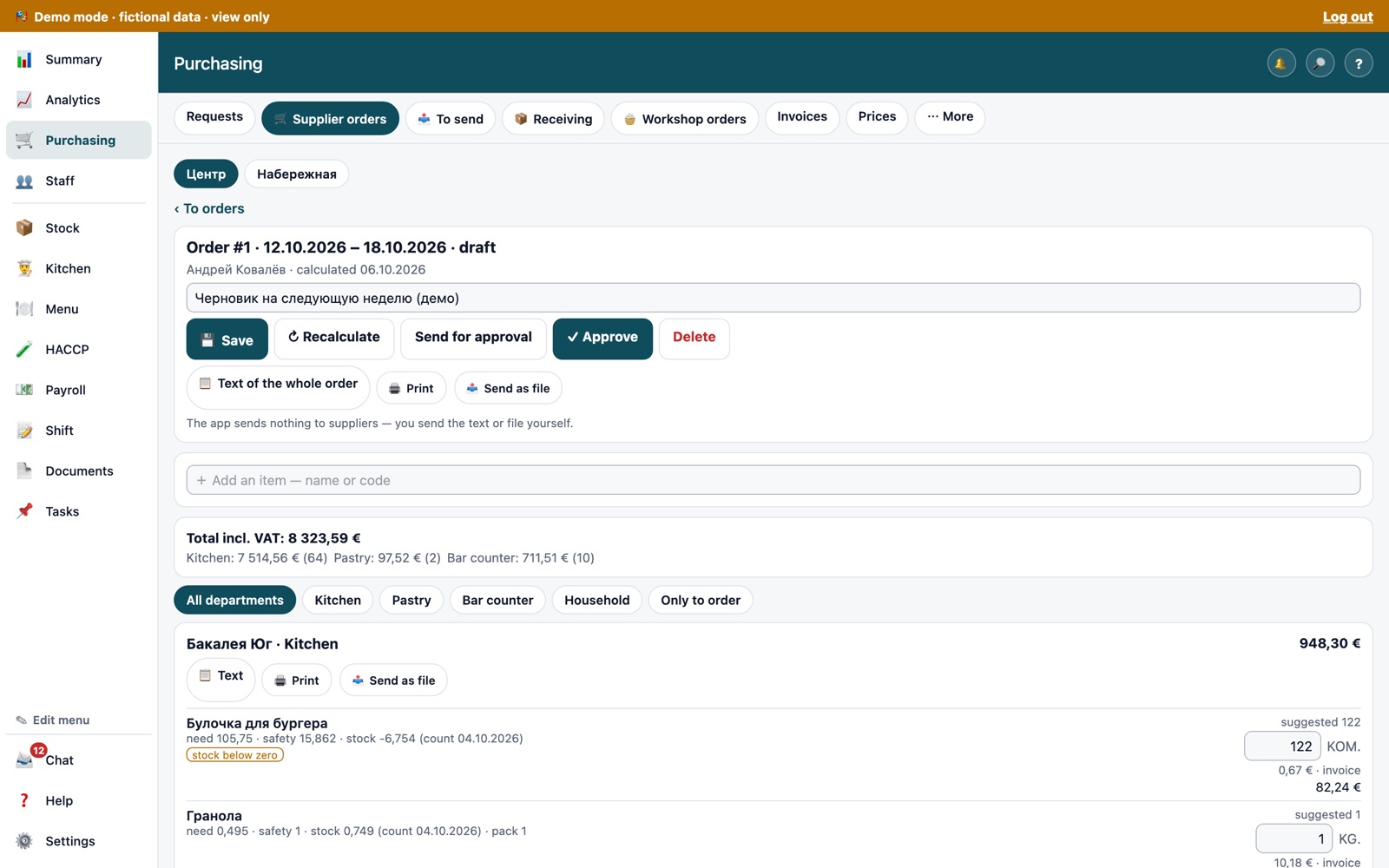
Supplier order: quantities suggested from sales and recipe cards (demo company)

FAQ

Didn't find your answer? Ask us in the request form below.

Does it work for businesses other than restaurants?

Yes. Staff, clock-in, purchasing, stock, documents, tasks and chat are useful for any business with a team and goods. Kitchen and recipe modules can stay off — for example, in a beauty salon or a shop.

Do I need to change my POS?

No. Unit Control works on top of your POS: the connector only reads sales, purchases and stock and never writes back. If there is no connector for your POS yet, upload reports in Excel or CSV.

Where is my data stored?

On servers in the European Union. Backups are encrypted. You can export all your data at any time.

Which devices are supported?

Phones and tablets (iPhone, iPad, Android), PCs and Macs — in the browser or as an installed app.

What if the internet goes down?

Clock-ins, write-offs and other actions are saved on the device and sent once the connection is back.

Which languages?

English, Русский, Crnogorski and Українська. Each employee chooses their own language.

What do employees see?

Only what their role allows. An employee sees their schedule, a cook sees recipes without prices, the director sees everything. Roles and permissions are set by the director.

I have several locations — does it fit?

Yes. Modules are switched on per location, and pricing works the same way. From 3 locations, the Chain plan applies.

What data goes to the AI?

Only the numbers and short tables needed for the answer, and only within the asker's permissions. The AI only reads — it never changes or sends anything. AI modules stay off until you switch them on.

Can I take my data with me?

Yes, at any time: a ZIP archive with CSV and JSON tables by section, plus copies of files.

Request a free trial

14 days free, no card required. We'll get in touch, open demo access and help you connect your POS.

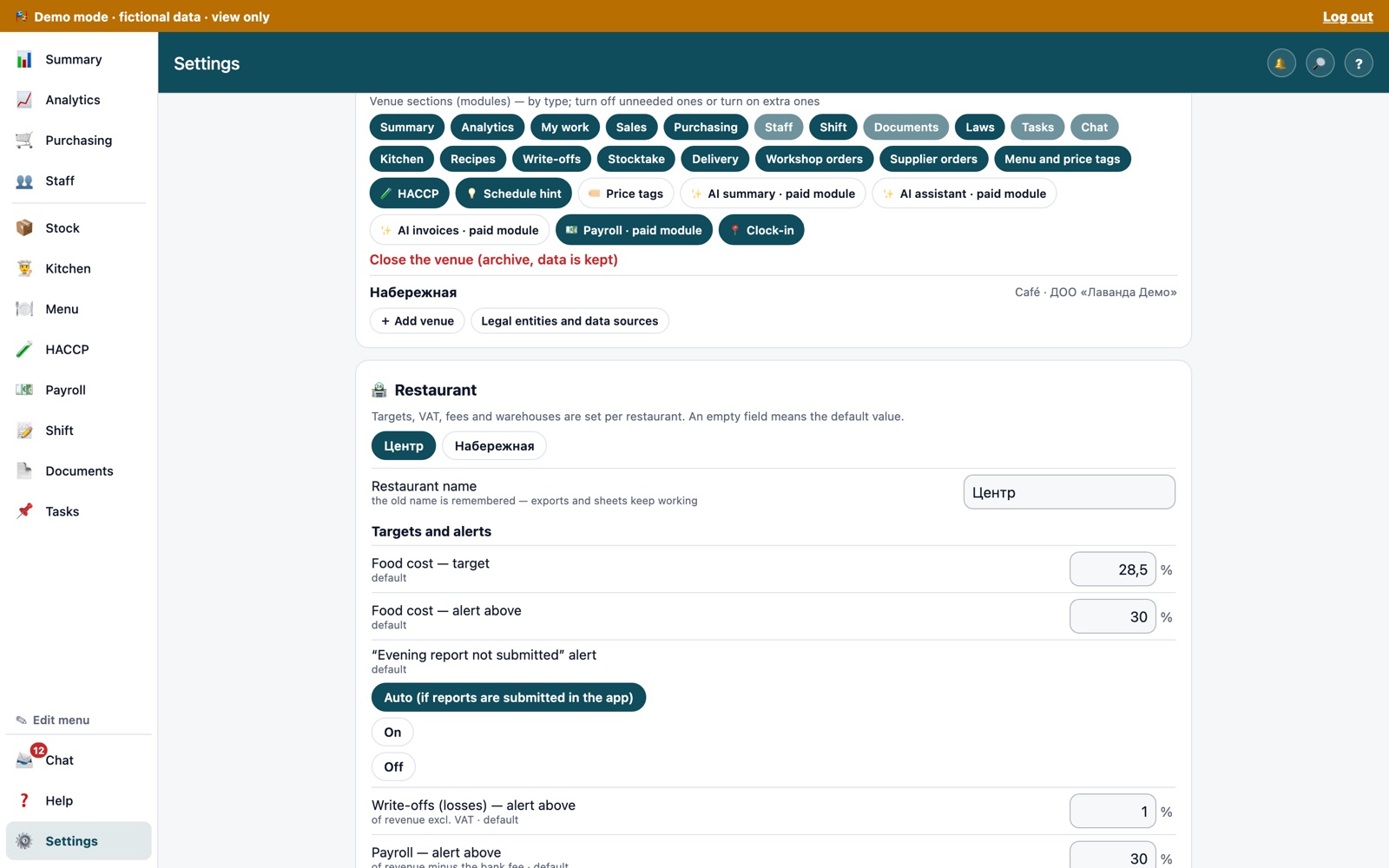
Venue settings: sections (modules) are switched on per location (demo company)